

Web数据源
设计目标:
在服务器上运行Web数据源服务端,自动将连接文件(connect.txt)中指定的Sql
Server服务器上的所有数据库作为Web数据源提供给其它的客户端使用。
客户端通过用户名和公司名,可以自动获得相应的数据库作为数据源。通过这种方法,不需要在客户端再设计数据连接,而是通过下面几点自动获取数据数据连接:
1. Web网址:由服务端提供的 HttpServer 确定
2. 用户名
3. 密码
4. 公司名(可能同一用户在多个数据库中都存在,为了能指向正确的数据源,需要指定公司名,公司名在下拉列表中选择)
另外,在客户端可以自主注册,由相应公司的Administrator批准后,可以使用数据源。
Web数据源的服务端与Sql Server可以不在同一个服务器上,这有助于移动端的开发。因为移动端需要备案的网址,在客户没有备好案之前,可以先临时用我们的服务器。
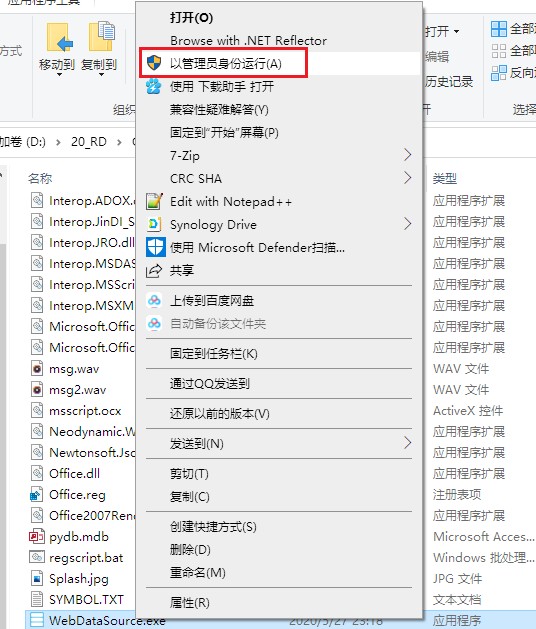
发布后的程序必须“以管理员身份运行”,否则无法启动Web服务。
服务端:
功能:
1. 启动Web服务的窗口
2.
自动建立本地数据源,代码放在 AfterOpenProject
或启动 Web服务的按钮中
If Connections.Contains("users") Then
Connections.Delete("users")
If FileSys.FileExists(ProjectPath & "connect.txt") Then
Dim
conn As String = FileSys.ReadAllText(ProjectPath & "connect.txt")
Connections.Add("users", conn)
Dim cmd As new SQLCommand
cmd.ConnectionName = "users"
cmd.CommandText = "SELECT name AS dbName FROM
master..sysdatabases WHERE name NOT IN ('master', 'model','msdb','tempdb',
'WebUser') ORDER BY name"
Dim
dt As DataTable = cmd.ExecuteReader()
If dt.DataRows.Count > 0 Then
For Each dr As DataRow In dt.DataRows
Dim
conn1 As String = conn.Replace("WebUser", dr("dbName"))
If Connections.Contains(dr("dbName")) Then Connections.Delete(dr("dbName"))
Connections.Add(dr("dbName"), conn1)
Next
End If
Else
MessageBox.Show("Please set connection string
in file: " & ProjectPath & "connect.txt", "Error", MessageBoxButtons.OK, MessageBoxIcon.Warning)
End If
3. HttpRequest 事件
3.1 客户端通过Post将用户名,密码,公司名提交给服务端
Dim
Verified As
Boolean = False
Dim
cmd As new SQLCommand
cmd.ConnectionName = "users"
If
e.PostValues.ContainsKey("username") AndAlso
e.PostValues.ContainsKey("password") Then
'实际开发的时候,请改为根据用户表验证身份
Dim
username As
String
= e.PostValues("username")
Dim password As String = e.PostValues("password")
cmd.CommandText =
"SELECT * FROM dbo.v_Users WHERE [name] = '"
& username
& "'"
Dim dt As DataTable =
cmd.ExecuteReader()
If dt.DataRows.Count
> 0 AndAlso dt.DataRows(0)("password") = password
Then
Verified = True
If dt.DataRows(0)("isPublic") =
False Then
e.AppendCookie("Error",dt.DataRows(0)("Company") &
", 贵司已欠费,请缴费后再使用!")
'通过Cookie返回错误信息.
Else
e.AsDataServer(dt.DataRows(0)("dbName"))
End If
End If
End
If
If
Verified = False Then
e.AppendCookie("Error","用户身份验证失败!") '通过Cookie返回错误信息.
Return
End
If
客户端
登录界面
Dim
sb As New StringBuilder
Dim
Err As String
sb.AppendLine("http://127.0.0.1")
sb.AppendLine("-FormData-")
sb.AppendLine("UserName:2")
sb.AppendLine("Password:888")
If
Connections.TryConnect(sb.Tostring, Err) = False Then
MessageBox.Show(err,"提示",MessageBoxButtons.OK,MessageBoxIcon.Error) '显示错误信息
Else
If Connections.Contains("dbMain")
Then Connections.Delete("dbMain")
Connections.Add("dbMain",sb.ToString)
MessageBox.Show("数据源可以正常连通!","提示",MessageBoxButtons.OK,MessageBoxIcon.Information)
End
If
移动端
注册界面
批准界面